How to read a phishing message
Phishing is the most common route into a home computer, and it is the one that software is least able to close. Blocklists catch yesterday’s domains; today’s were registered this morning. Reading the message is a skill that keeps working.
No commercial links on this page. This guide carries no partner links and earns nothing. The site is funded by affiliate commission on its product pages — see how we are funded.
The five signals
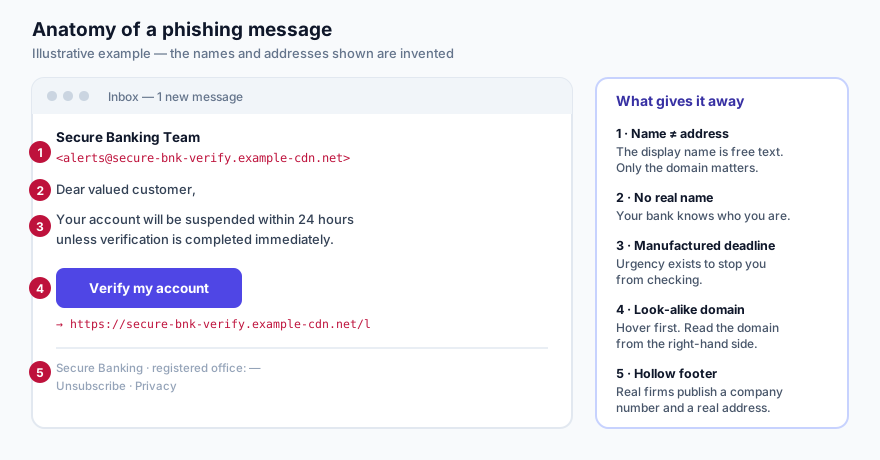
1. The display name is not the sender
The name you see in your inbox is free text chosen by whoever sent the message. It costs nothing
to type “Secure Banking Team”. The only part that is hard to fake is the domain after
the @ — so that is the only part worth looking at. On a phone you usually have to
tap the sender name to reveal it, which is exactly why phishing works better on phones.
Read a domain from the right. In
secure-bnk-verify.example-cdn.net, the organisation is example-cdn.net.
Everything to the left of it is decoration the attacker controls.
2. It does not know who you are
“Dear valued customer”, “Dear user”, or your email address used as a name. Organisations you actually hold an account with know your name and generally use it. This signal is weakening — breached data makes personalised phishing cheap — so treat a correct name as the absence of a warning, not as reassurance.
3. There is a deadline that exists to stop you checking
Twenty-four hours. Immediate suspension. A parcel that will be returned. A fine that doubles. Urgency is not incidental to phishing; it is the mechanism. It is there to move you from the part of your mind that checks things to the part that reacts.
The counter-move is procedural rather than clever: never act from the message. If your bank really needs you, it will still need you in ten minutes when you have opened their app or typed their address yourself.
4. The button and its destination disagree
On a desktop browser, hover over the link and read the address in the status bar. On a phone, press and hold to see the destination without opening it. Look for:
- A real brand name used as a subdomain of something else:
yourbank.secure-login.example.netis not your bank. - Character substitutions:
rnform, a digit1for a letterl, or accented look-alikes from another alphabet. - A link shortener on a message that claims to be from a financial institution. Banks do not need to shorten their own URLs.
5. The footer is hollow
A genuine European business publishes a registered address and a company number — it is required of them, which is why ours is in the footer of every page on this site. Phishing footers copy the branding and leave the registration details blank or wrong, because inventing them creates an additional, checkable lie.
Where phishing arrives now
Email remains the volume channel, but the same message arrives by SMS (“smishing”), by messaging app, through a fake advertisement at the top of search results, and by voice call claiming to be support. The tells are the same because the pressure is the same: an urgent problem, a convenient link, a reason not to check.
The single most useful habit. Treat any link in any unexpected message as unusable. Not suspicious — unusable. Go to the organisation the way you normally do: your bookmark, your app, the number on the back of your card. This one rule defeats nearly all of it and requires no judgement in the moment, which is the point.
What software can and cannot do here
A security product with browser protection blocks known phishing domains and warns you when a download is recognised as malicious. That is genuinely useful and it is in most paid suites, including the one our product page covers. What it cannot do is recognise a domain registered an hour ago, or stop you typing a password into a page that looks right. The software narrows the window; it does not close it.
If you have already clicked
- Did you only visit? Close the tab. Visiting a page rarely compromises an up-to-date browser on its own.
- Did you enter a password? Change it now, on the real site, and change it anywhere else you used the same one. Turn on two-factor authentication while you are there.
- Did you enter card details? Call your bank using the number on the card, not any number in the message. Ask them to block the card.
- Did you run a downloaded file? Disconnect from the network, run a full scan, and change your important passwords from a different device — not the one that may be logging your keystrokes.
- Report it. Forward to your bank’s fraud address and to your national cyber-security authority. In the Czech Republic that is NÚKIB (nukib.gov.cz). Reports feed the blocklists that protect everybody else.
Sources and further reading
- ENISA, Threat Landscape — annual assessment of threat prevalence in the EU.
- NÚKIB — Czech National Cyber and Information Security Agency, nukib.gov.cz.
- UK National Cyber Security Centre, phishing guidance — practical and vendor-neutral.
Read next: passwords that survive a breach.